
PersiaHR questionnaires: convenient way to simplify candidate selection
The PersiaHR team always strives to make the recruiter’s workflow as efficient as possible. That is why we continue to improve our system and are excited to introduce a brand-new feature: Candidate Questionnaires.
We are currently launching the first version of this tool. It is important to us that you get access to this new functionality right away and test it out in your day-to-day operations. We plan to actively develop and refine the questionnaire feature, and we would be genuinely grateful for your feedback, comments, and suggestions.
What is a questionnaire?
Questionnaires are a quick way to automate the initial screening process. Candidates answer the questions, and the system automatically calculates their percentage match based on your requirements.
How this simplifies a recruiter’s life:
-
Time saved on screening: especially beneficial for high-volume hiring, where automated grading helps instantly filter out candidates who don’t match the criteria.
-
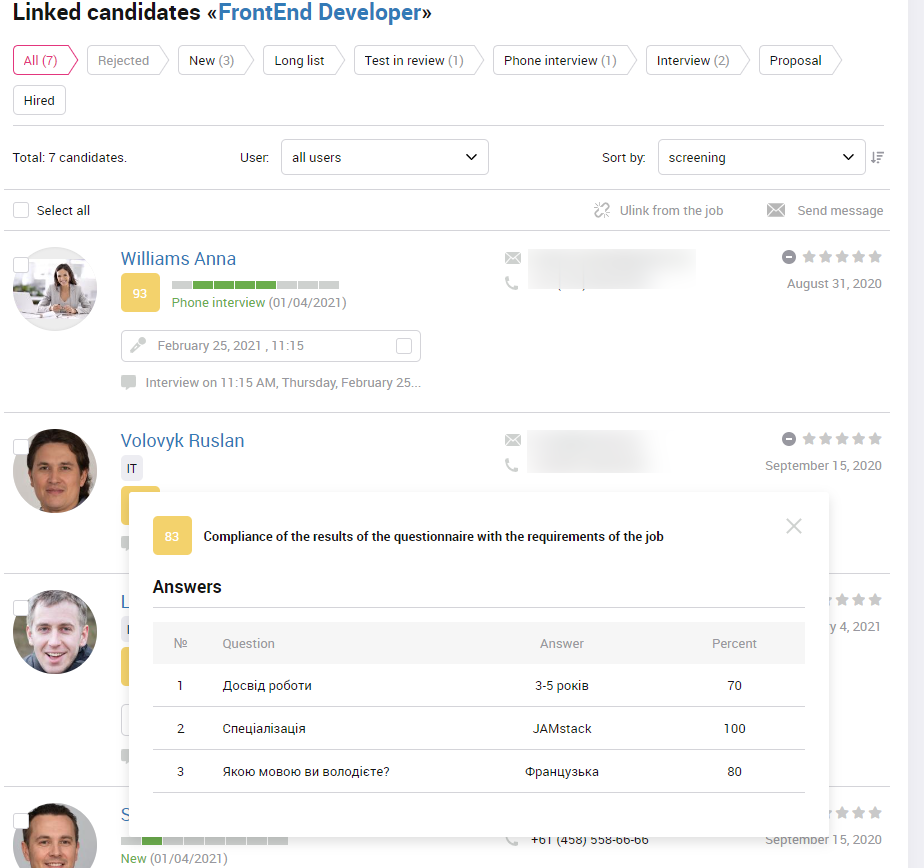
Convenient sorting: you can sort candidates by their results—the higher the score, the higher the candidate appears on your list.
-
Everything in one place: you can view a candidate’s detailed answers directly from the pipeline page.
How does it work?
In Account Settings you have a section Questionnaire Templates. To get you started, we have already added several system templates for various positions. You can edit them, delete them, or create your own from scratch:
-
Click Add template, enter a name, and click Save.
-
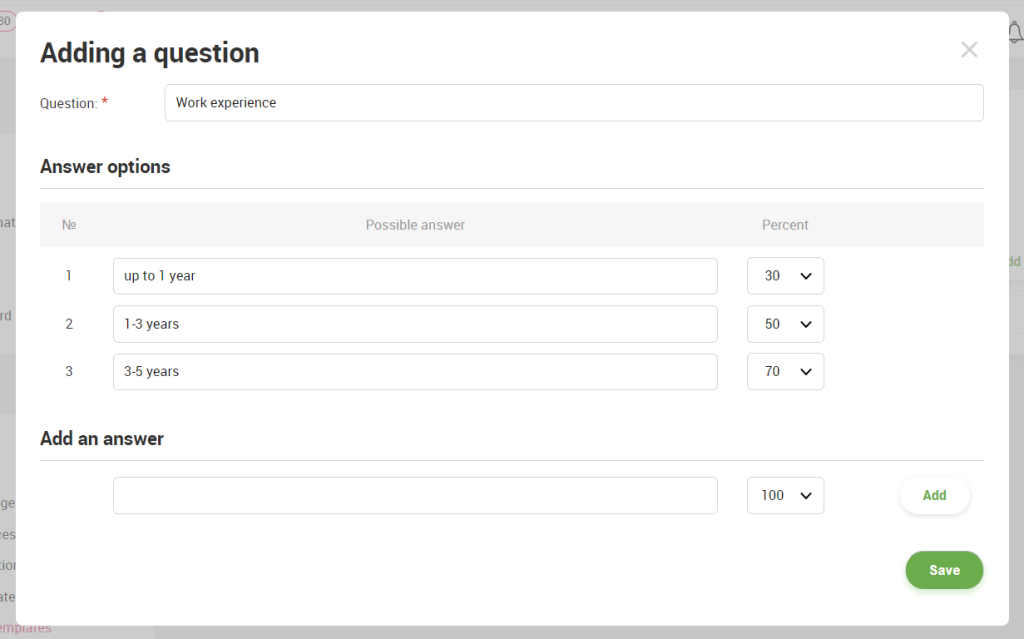
Click Add question, type in the question and answer options, and set the match Percentage (with 100% being the ideal answer required from the candidate).
-
You can easily reorder questions by simply dragging and dropping them.
After that, the questionnaire can be linked to an open job. On the Open Jobs page, choose the position you need, click Questionnaire (screening) in the left-hand menu, select a template, and click Create. If necessary, you can tweak the questionnaire to fit that specific role.
Now you are ready to start screening. Go to the Linked candidates page, go to the candidate’s page. Click on the Questionnaire tab. Next, select the questionnaire template from the drop-down list.
You can send a candidate a questionnaire in several ways:
- Click Fill. A form will open. You can send this form to the candidate in any way.
- Click Send. You will see a window for sending a message with a questionnaire. The candidate will receive the form by email.
- Click Copy Link. The link to the questionnaire will be copied to the clipboard, and you can immediately send it to the candidate in any messenger.

As soon as the candidate submits the form, their answers will instantly appear in PersiaHR. The system will automatically calculate the average match percentage across the entire questionnaire based on the weights you assigned. All that’s left for you to do is sort the candidates and invite the top talent to the next round.
We explain more about the Questionnaire in one of our videos:
Since this is the first version of our Questionnaire feature, your user experience is incredibly valuable to us. Please share your thoughts, feedback, and ideas with our support team. We will definitely take your suggestions into account when developing future updates.
PersiaHR team
clients@PersiaHR.com
+38 (099) 362-53-10